Growth system
Dark FactoryHow it worksCase studiesPricing
Resources
ContactBook a growth review

Business operating system

The business operating system
you run from a chat.

Syntra is a business OS for service businesses: your website, AI agents, bookings, payments, customer records and marketing in one system. Run it from Claude or ChatGPT, with an expert who sets it up and runs it with you.

3 goals18 modules120+ AI tools1 customer record

The short answer

What is a business operating system?

A business operating system (BOS) is the way your business runs, written down and built in: the steps, tools and data that take a customer from first search to repeat visit, so the work still happens when you are not there.

01 · What it isn’t

Not Windows, and not just meetings

The name borrows from computers, but a business operating system has nothing to do with the software on your laptop. It is also more than a meeting rhythm. Frameworks like EOS, the Entrepreneurial Operating System from the book Traction, shape how a leadership team plans and reviews. The work itself still runs on tools.

02 · Two meanings

The framework and the software

You will see the term used two ways: a management framework for how leaders run the company, or software that runs the work. Syntra is the second kind, built for the customer side of service businesses: getting found, answering enquiries, booking, taking payment and bringing people back.

03 · The off-sick test
“A system is anything that still works when the person who usually does it is out sick. A habit lives in a person. A system is written down, has an owner, and has some way of telling you when it breaks.”
A business owner on r/smallbusiness

That is the best test we know. If your enquiries, bookings and follow-ups stop when you take a week off, you have habits, not a system. A business OS is how the habits become the system.

Without one

  • A website builder, a booking app, a CRM, an invoicing tool and an email tool
  • The same customer typed into three places
  • You, holding it together in the evenings

With a business OS

  • One system for the whole customer journey
  • One customer record every part reads from
  • Run it from a chat, with an expert behind it

Works with your AI assistant

Ask in a chat. Syntra does the work.

Connect Syntra to Claude or ChatGPT once. From then on you run your business by asking: no dashboards to learn, no extra logins. It drafts, you approve.

Works with

120+tools your assistant can use in your Syntra
1connection, then plain English from any chat
0changes go live by accident: drafts and approvals first
Your assistant · connected to SyntraExample

Plan our articles for the next three months, from what customers actually ask.

Done. Twelve articles queued, one a week from Monday, each built on a real question. Want to read the first draft?

Yes. And how are the Google Ads doing?

Spend is on budget. One campaign’s cost per enquiry has crept up, so I’ve suggested two fixes for you to approve.

An example conversation, not a real account.
Google Ads

“Keep an eye on my Google Ads campaigns.”

Watches your campaigns, explains what changed and suggests fixes. Nothing reaches Google until you approve it.

Article queue

“Plan our articles for the next three months.”

Researches topics from real customer questions, drafts the articles and queues them to publish on the dates you choose.

Search & content

“Which pages could better answer what people search for?”

Reads your search data, finds the questions people ask and rewrites your pages to answer them, as drafts with a preview.

Google profile

“Draft replies to this week’s reviews.”

Drafts review replies and posts, and keeps your Google Business Profile up to date.

Customers

“Who enquired this week but hasn’t booked?”

Pulls leads, bookings and customer history from your CRM, so you know who to follow up.

Numbers

“How did last month go?”

Reads your bookings, revenue, enquiries and website traffic, and explains what moved.

Guard-rails, not guesswork

  • Website changes come back as drafts with a private preview link
  • Ad changes wait for your approval before they reach Google
  • Booking changes need an explicit yes
  • You choose what the assistant can see: clinical notes, medical history and signatures can be withheld completely
  • Every action the assistant takes is logged

Why not build your own in Claude Code?

You can, and plenty of people are trying. The hard part isn’t the prompts. It is the website, bookings, payments, customer records and connections underneath, kept running every day. Syntra is the finished version of that, with an expert behind it, so your assistant has something solid to work with.

Plus AI built into the system itself: AI agents that answer calls and chats, and AI visibility tracking that shows whether ChatGPT and Google’s AI recommend you.

Examples

Examples of business operating systems.

Business operating systems come in four broad kinds. Most businesses already run on a mix of the first three.

Management frameworks

Shared ways of working

The Toyota Production System and the Danaher Business System are the classic examples: one way of running things, installed across a whole company. EOS, from the book Traction, and Scaling Up bring the idea to smaller firms through meetings, scorecards and goals.

Software platforms

Tools in one place

CRM-led suites, Notion-style workspaces and all-in-one marketing platforms put the work in one place. Most are do-it-yourself: powerful when someone has the time to set them up and keep them running, and a pile of half-built features when nobody does.

Industry systems

Built for one sector

Clinics, salons and trades often run on practice or job management software made for their sector, then bolt on separate tools for the website, marketing and reviews. The core works; the edges leak.

Co-managed systems

Where Syntra sits

One system for the whole customer side of the business, from first search to repeat visit, set up and run with an expert, and controllable from Claude or ChatGPT.

Side by side

Business OS, EOS and operating model.

Three terms that get mixed up all the time. They answer different questions, and they work best together.

Business operating system compared with EOS and an operating model
CompareSoftwareBusiness operating systemFrameworkEOSDesignOperating model
What it isSoftware that runs the day-to-day workA framework for how leaders plan, meet and solve issuesA description of how a business is organised to deliver
The question it answersHow does the work get done, every day?How do we decide, prioritise and hold people to account?Who does what, where, with which tools?
Made ofWebsite, enquiries, bookings, payments, CRM, marketing, reportsSix components: Vision, People, Data, Issues, Process, TractionStrategy, structure, processes, systems, locations
Where you feel itEvery customer’s journeyYour leadership meetingsYour org chart and plans
ExampleSyntraEOS (Entrepreneurial Operating System)A three-clinic group with shared marketing and local teams

In short: an operating model says how the business is organised, EOS says how its leaders run it, and a business operating system like Syntra does the daily work and produces the numbers they review.

In owners’ own words

Signs you need a business operating system.

We read through owners’ threads on Reddit while building this page. These six came up again and again.

01
“I am exhausted of having to jump between 10-20 different apps all day.”
r/smallbusiness

With a business OS: One system for the website, enquiries, bookings, payments and marketing. One login, one customer record.

02
“Yes I am the glue of the business.”
r/smallbusiness

With a business OS: Reminders, follow-ups and reactivation run on their own, so the business doesn’t stop when you do.

03
“Most software focuses on booking, not what happens after someone inquires, misses, or drops off.”
r/MedSpa

With a business OS: AI agents answer enquiries day and night, and automations chase the ones who didn’t book or didn’t come back.

04
“You’re trying to remember where the allergy note lives.”
r/EstheticsBusiness

With a business OS: Intake, consent, notes and photos sit on one client record, ready before the client walks in.

05
“None of the booking platforms talk to each other.”
r/ConsultantDoctorsUK

With a business OS: Bookings, payments and reminders share one diary, so you are not juggling platforms or typing details in twice.

06
“Negotiate the exit before you sign the entry. Data export format, who owns the records.”
r/smallbusiness

With a business OS: Your website and all your data are yours. If you leave, we help you move it.

Inside Syntra

Three goals. 18 modules.

Everything a service business needs to get found, win customers and keep them, in one business OS.

01

Get found

Be the business Google, Maps and AI assistants recommend.

Online visibility: how it works →

One operating system, not 18 tools

Every module works from the same customer record. Nothing to copy across, nothing to keep in sync, nothing lost between apps.

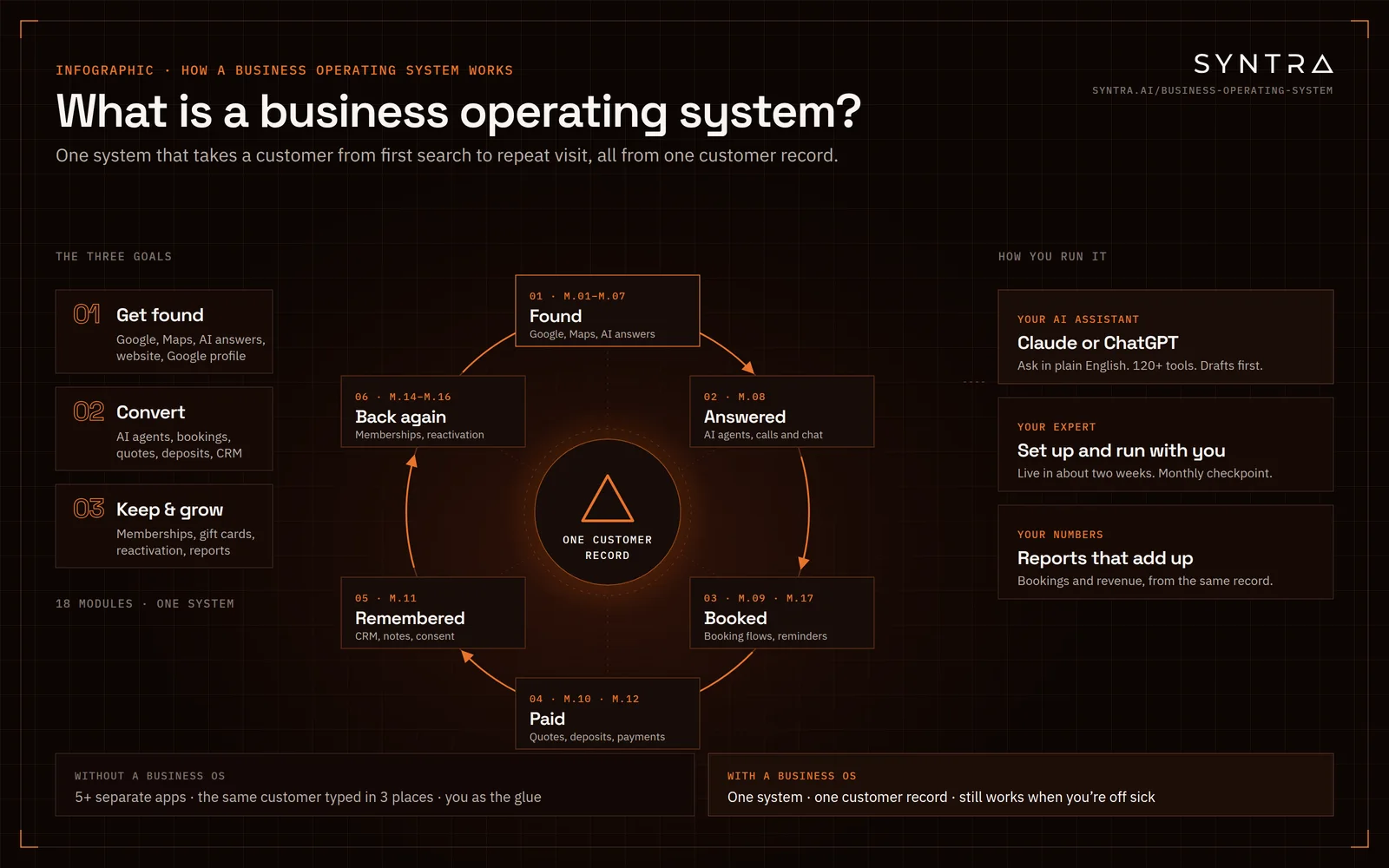
  1. 01 · M.02 · M.04

    Found

    They find you on Google Maps, or an AI assistant names you.

  2. 02 · M.08

    Answered

    Your AI agent answers their call and books them in.

  3. 03 · M.12 · M.17

    Booked

    A deposit secures the slot. Reminders go out on their own.

  4. 04 · M.11

    Remembered

    The visit, payment and notes land on one customer record.

  5. 05 · M.16

    Back again

    When they go quiet, reactivation brings them back.

  6. 06 · M.18

    Measured

    Reports show the bookings and revenue it made.

One customer, one record, the whole journey (illustrative).

Infographic explaining a business operating system: six stages of the customer journey (found, answered, booked, paid, remembered, back again) loop around one customer record, grouped into three goals and run from Claude or ChatGPT with an expert.
Infographic How a business operating system works: one customer record at the centre, the six stages of the customer journey around it, the three goals they serve and how you run it.

Healthcare

A business operating system for clinics.

Healthcare raises the stakes. Patient data is special category data, consent and records are inspected, and health claims in adverts are policed. Two clinics show what a business OS looks like when more is at risk.

Case example · Ultrasound

Numi Scan

A group of private ultrasound clinics in North East England.

+35%bookings
+57%average order value

Numi’s results in Numi’s market, not a promise of yours. CQC treats every ultrasound scan, keepsake scans included, as a regulated activity (CQC).

  • Consent forms, digitised

    Patients fill in and sign consent online before they arrive. A PDF copy is stored encrypted in a UK data centre with an access log, and the diary shows which appointments still owe a form, with a one-click reminder.

  • Clinics that work together

    Each clinic runs its own system, linked to its sister clinics. A booking can move to another clinic with its form answers, extras and payments, and the patient is emailed. The first version of that module was live within about a day of being asked for.

  • A scan finder that knows the rules

    The AI agent works out how many weeks pregnant someone is and only offers the scans they are eligible for. Staff can ask who is due their next scan and hasn’t booked.

  • Content with approval

    Every website change is a draft with a private preview. Prices, offers and opening hours go to a named approver before they change, and every change is logged.

  • Checks on wording

    Before anything publishes, the CMS flags words health regulators warn about, such as “safe”, “painless” or “act now”, and unregistered “specialist” titles.

Case example · Medical aesthetics

Bravo MedSpa

A medical aesthetics clinic, from the front desk to the treatment room.

Day to day, the team runs the clinic on Syntra: bookings, consent, treatment notes, photos, memberships and follow-ups on one client record, with AI that does the paperwork and leaves the clinical judgement to the practitioner.

  • Treatment notes on one record

    SOAP notes or the clinic’s own templates, face and body diagrams to mark treatment areas, and a before and after photo timeline, all on the client’s record and saved as encrypted PDFs.

  • Senior sign-off

    A note template can require review, so a senior practitioner approves or returns notes with comments.

  • Know the patient in seconds

    Ask Syntra to “summarise Sarah’s last six months” and get a timeline of treatments, progress, products used, goals and any concerns flagged on her intake forms.

  • Plan the next treatment

    Describe today’s treatment in plain words. Syntra drafts the note in the clinic’s template, carries forward goals and progress, and drafts the plan for the next session. The practitioner reviews it; nothing is finalised without them.

  • The day-to-day

    Bookings, deposits, no-show fees, reminders, memberships and treatment packages run in the same system, so the front desk and the treatment room see the same client.

What a business OS changes for a clinic

Consent, intake and records

CQC expects consent to be sought properly (Regulation 11) and records to be accurate, complete, contemporaneous and secure (Regulation 17). Syntra keeps intake, signed consent, notes and photos together, with the signature, time and device recorded. The practitioner still seeks consent; Syntra keeps the evidence in one place.

Patient data and AI

Health data is special category data under UK GDPR (ICO). When you connect Claude or ChatGPT, you choose what the assistant can see: clinical notes, medical history and signatures can be withheld completely, and every AI action is logged.

Marketing inside the rules

UK advertising rules ban promoting prescription-only medicines such as Botox to the public, including on social media (ASA). For aesthetics sites, Syntra flags those names and other risky wording before a page publishes. It is guidance drawn from the regulators’ rules, not legal advice.

Deposits that hold up

Deposits and no-show fees work best when they are clear and fair: the CMA says they must reflect your genuine loss (CMA37). Syntra sets them per service and records each one against the booking.

More than one site

Each clinic keeps its own system and records, linked so bookings move between sites with their answers and payments. A transfer checks the slot is free at the other site first, and each site’s numbers stay its own.

What’s changing

The government is consulting on limiting high-risk cosmetic procedures to doctors, dentists and prescribing nurses, midwives and pharmacists, enforced by CQC. The consultation closes on 13 January 2027 (DHSC). Clinics with consent, notes and practitioner records in one place will find changes like this easier to absorb.

General information drawn from the regulators’ published guidance, not legal advice.

Run with an expert

The system is half of it. The expert is the other half.

All-in-one software only works when someone sets it up properly and keeps it running. So every level includes an expert.

01

Set up around you

Your expert sets up the system for how your business works, not a template.

02

Moved across

Your website and data move with you. Most businesses are live in about two weeks.

03

Run with you

Fix what matters first, then a monthly checkpoint to build what comes next.

04

Yours to keep

Your website and all your data are yours. If you ever leave, we help you move it.

An honest answer

All-in-one or separate tools? Is it right for you?

One system is not the answer for everyone. Here is where Syntra fits, and where it doesn’t.

A good fit

  • Service businesses that run on bookings and enquiries
  • Clinics and practices that need consent, notes and marketing in one place
  • Groups with more than one site that want bookings to move between them
  • Owners who want it run with an expert, not another tool to learn

Probably not for you if

  • You need stock, manufacturing or supply-chain software (that is an ERP)
  • You want to build and run everything yourself
  • One cheap booking app already does everything you need
  • You want us to replace your accounting software: Syntra sends invoices and takes payments, but your accountant keeps their package
Pricing

Every level includes an expert who sets it up and runs it with you. Pricing is tailored to your business: we work it out with you in your free growth review.

Book a free growth review

Questions

Business operating systems, answered.

Something else? Ask it in your free growth review.

What is a business operating system?

A business operating system is the way a business runs, written down and built in: the steps, tools and data that take a customer from first search to repeat visit, so the work still happens when you are not there. As software, a business OS puts those jobs in one system instead of a stack of separate apps.

What does business OS mean?

Business OS is short for business operating system. People use it for two things: a management framework such as EOS, or software that runs the day-to-day work. Syntra is the second kind, built for service businesses.

Can you give me an example of a business operating system?

Syntra is one. At a clinic on Syntra, a patient finds the clinic on Google Maps, the AI agent answers and books them in, consent is signed online, a deposit secures the slot, the visit and notes land on one record, and reactivation brings them back. Classic management examples include the Toyota Production System and EOS.

What is EOS, and is Syntra the same thing?

EOS, the Entrepreneurial Operating System from the book Traction, is a management framework built on six components: Vision, People, Data, Issues, Process and Traction. Syntra is software that runs the work itself. They sit well together: EOS for how you lead, Syntra for how the business runs and the numbers you review.

What is the difference between a business operating system and an operating model?

An operating model describes how a business is organised to deliver: its structure, processes, people and locations. A business operating system is what that model runs on day to day: the tools, data and routines that do the work.

Is a business operating system like Windows or macOS?

No. The name borrows from computers, but a business operating system has nothing to do with the software on your laptop. It is about how the business runs, and Syntra works in any web browser and from your AI assistant.

What is the difference between a CRM and a business operating system?

A CRM keeps track of customers and deals. A business OS for a service business includes a CRM, and adds the website, enquiries, bookings, payments, marketing and reports around it, all reading from the same customer record.

Is all-in-one software actually simpler?

Only when someone sets it up properly and keeps it running. Plenty of owners have bought an all-in-one and used a fraction of it. That is why every Syntra level includes an expert who sets it up, moves your data across and runs it with you.

What happens to my data if I leave?

Your website and all your data are yours. If you ever want to leave, we help you move it.

How long does setup take, and who does it?

About two weeks for most businesses. An expert sets the system up and moves your website and data across. See how it works.

How much does a business operating system cost?

Pricing depends on your business and how much we set up and move across, so we work it out with you in your free growth review, with no obligation.

Is Syntra suitable for patient data under UK GDPR?

Syntra is built with clinics in mind: signed forms and treatment notes are stored as encrypted PDFs in a UK data centre with an access log, staff get their own logins with limited access, and AI assistants can be blocked from clinical data. Your clinic remains the data controller, so you still need your own policies and ICO registration.

Are digital consent forms valid?

Electronic signatures are generally valid in England and Wales (the Law Commission confirmed this in 2019). Syntra records who signed, when and on what device, and keeps a PDF copy. The content of the form, and seeking consent properly, remain the clinic’s responsibility. This is general information, not legal advice.

Do deposits reduce no-shows, and are they fair?

Deposits give people a reason to turn up or cancel in time. In the UK, the CMA says deposits and cancellation fees must reflect your genuine loss, so set them per service and say so clearly when people book.

Can I run Syntra from Claude or ChatGPT, and what can the AI change without me?

Yes. Connect once and your assistant can use over 120 tools. Website changes come back as drafts with a preview, ad changes wait for your approval, booking changes need an explicit yes, you choose what data it can see, and every action is logged.

Does it work for more than one location?

Yes. Each site runs its own system and records, linked so a booking can move to a sister site with its answers and payments.

Is Syntra the same as Sintra AI?

No. Syntra, with a y, is a business operating system for service businesses, run with an expert. Sintra is a different company.
Next step

See your business running from a chat.

Book a free 30-minute growth review with an expert.